


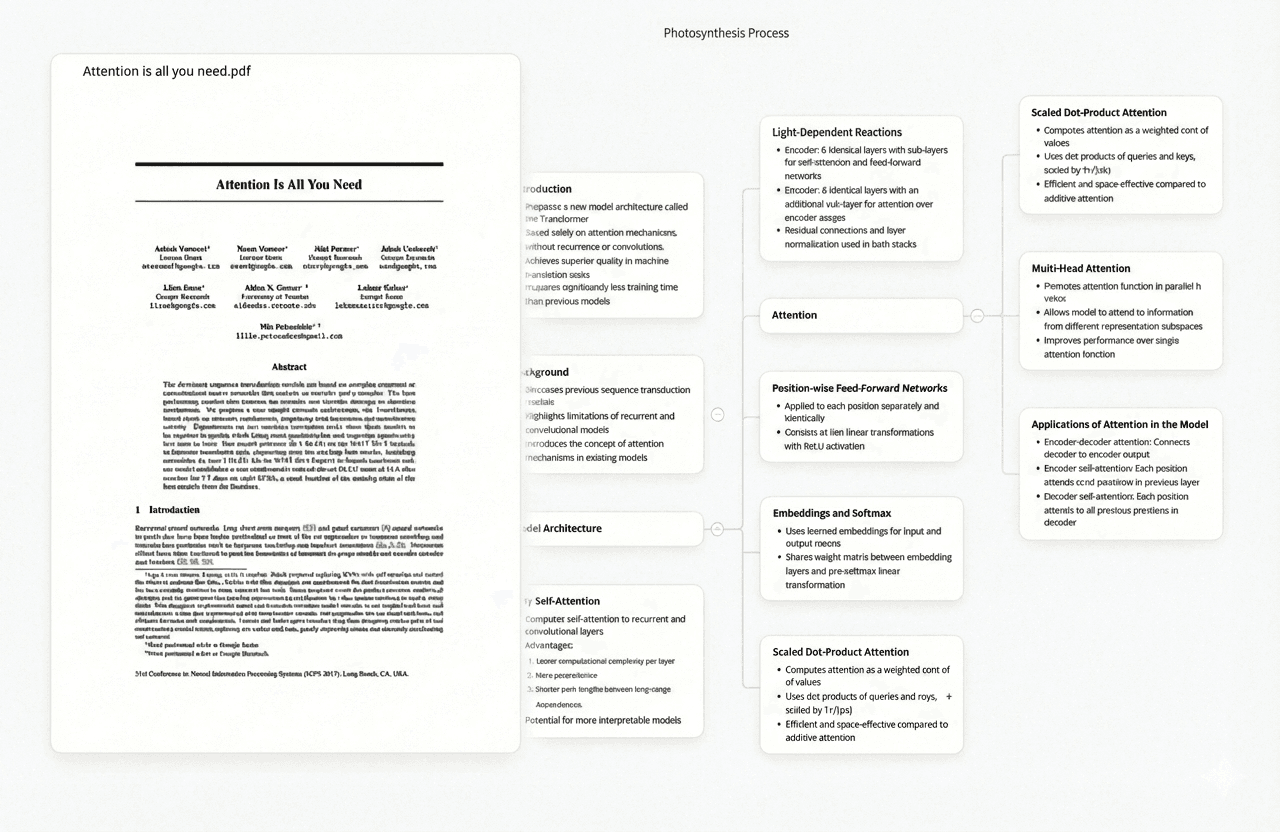
In the fast-paced academic landscape of 2026, students are navigating an ever-increasing volume of information. The pressure to conduct thorough research, synthesize complex ideas, and produce high-quality academic work has never been greater. Fortunately, a new generation of AI-powered tools has emerged to meet this challenge — transforming the way students approach research from the ground up. These tools are not about replacing critical thinking; they are about augmenting it, helping you work smarter and more strategically. From organizing a sprawling literature review to drafting your thesis with precision, the right AI can be your most valuable academic partner.
This guide provides a comprehensive, tested overview of the best AI research tools available to students in 2026. We cover 11 tools across a range of use cases — from all-in-one knowledge workspaces to specialized tools for citation management, systematic reviews, and academic writing. Our top recommendation, Ponder, is featured first with an in-depth breakdown of its student-specific use cases, followed by detailed profiles of ten other powerful contenders to help you build the ultimate AI-powered research workflow.
Quick Comparison: Best AI Research Tools for Students 2026
# | Tool | Best For | Free Tier | Starting Price |
1 | All-in-one knowledge workspace | Yes | $8/mo | |
2 | Perplexity AI | Real-time cited search | Yes | $20/mo |
3 | Consensus | Scientific evidence synthesis | Yes | $9/mo |
4 | Elicit | Systematic literature reviews | Yes | $10/mo |
5 | Google NotebookLM | Studying your own documents | Yes | $19.99/mo |
6 | SciSpace | Exploring scientific papers | Yes | ~$12/mo |
7 | Smart citation analysis | Trial only | $20/mo | |
8 | ResearchRabbit | Visual literature discovery | Yes (Free) | Free |
9 | Jenni AI | Academic writing & citations | Yes | $12/mo |
10 | Paperpal | Academic editing & proofreading | Yes | ~$11.58/mo |
11 | Zotero | Reference management | Yes (Free) | Free |
1. Ponder — The Best All-in-One AI Research Workspace for Students
Ponder is our top pick for students in 2026, and for good reason. It is the first truly all-in-one knowledge workspace built around how the human mind actually works — not around how software engineers think research should work. Rather than forcing you into a rigid, linear workflow, Ponder gives you an infinite canvas where ideas can branch, connect, and evolve naturally. It brings together mind mapping, document analysis, AI-powered conversations, and structured note-taking into a single, cohesive environment. Trusted by researchers at MIT, Stanford, Harvard, Oxford, and Tsinghua University, Ponder is rapidly becoming the go-to platform for serious academic work.
Why Ponder Leads the Pack
What sets Ponder apart from every other tool on this list is its philosophy. Most AI research tools are designed to answer questions. Ponder is designed to help you think better. Its core insight is that research is not a linear process of collecting facts — it is a dynamic, iterative process of building understanding. The platform's visual canvas reflects this reality, allowing you to see how ideas connect, where your thinking has gaps, and how different sources relate to one another.
The Ponder Agent is the centrepiece of this experience. Unlike a standard chatbot that responds to isolated queries, the Ponder Agent accompanies you throughout your entire research process. It spots blind spots in your argument, suggests connections between disparate sources, helps structure your insights, and challenges your assumptions — all within the context of your specific project. This is not a tool that writes your paper for you; it is a tool that makes you a more rigorous and creative thinker.
Student Use Cases in Depth
Undergraduate Research Papers: For undergraduates tackling their first major research assignment, Ponder provides an intuitive starting point. You can drop in your course readings, ask the AI to summarize and compare them, and then use the canvas to build a visual argument map before you write a single word. This transforms the overwhelming task of "reading everything" into a structured, manageable process.
Literature Reviews: Graduate students and PhD researchers will find Ponder's literature review capabilities particularly powerful. You can upload dozens of papers at once, and the AI will help you identify recurring themes, methodological differences, and gaps in the existing research. The visual knowledge graph makes it easy to see the "shape" of a field at a glance — something that would take weeks to construct manually.
Thesis and Dissertation Writing: For long-form research projects, Ponder serves as a centralized research hub. Every note, every paper, every idea lives in one place and can be connected to everything else. When it comes time to write, you already have a structured map of your argument, complete with supporting evidence. The ability to export your thinking as structured reports or clean Markdown means your Ponder workspace can feed directly into your writing process.
Exam Preparation and Concept Mapping: Ponder is not just for research papers. Students can use it to build concept maps for complex subjects, turning dense textbook chapters into visual, interconnected knowledge structures that are far easier to revise from.
Pros | Cons |
All-in-one workspace eliminates the need to switch between multiple tools | Feature richness can involve a short learning curve for new users |
Visual, canvas-based interface mirrors natural thinking processes | Premium plans may stretch a tight student budget |
Ponder Agent provides deep, context-aware AI assistance | Relatively newer platform compared to some established tools |
Excellent for literature reviews, thesis work, and long-form projects | Offline functionality is currently limited |
Export to Markdown, mind map, and structured reports | AI credit limits on lower-tier plans |
Ponder Pricing
Plan | Price (Billed Annually) | Key Features |
Free | $0/month | 20 AI credits/day, 5 uploads/day, 150MB/upload, Unlimited Ponders, AI fetch & save |
Casual | $8/month | 800 AI credits/month + 20/day, Unlimited uploads/downloads |
Plus (Most Popular) | $24/month | Unlimited basic AI usage, 2,500 AI credits/month, Unlimited uploads |
Pro | $48/month | 6,000 AI credits/month, full feature access |
Student Tip: Start with the free plan to explore the platform. For intensive thesis or dissertation work, the Plus plan at $24/month offers the best balance of unlimited basic AI usage and generous credit allocation. Use code PONDER15 at checkout for an additional 15% off any paid plan.
Key Links:
•Read the Ponder blog for tutorials and use cases
The Contenders: 10 More Top AI Research Tools for Students
While Ponder is our top recommendation for a comprehensive research workspace, the AI research landscape offers a rich ecosystem of specialized tools. The most effective student researchers in 2026 use a curated combination of tools, each optimized for a specific stage of the research workflow. Here are ten other excellent options.
2. Perplexity AI
Best For: Quick, cited answers and real-time information gathering.
Perplexity AI has established itself as one of the most popular AI tools for students who need fast, reliable answers with sources attached. Unlike a standard search engine, Perplexity synthesizes information from multiple web sources and presents a coherent answer with inline citations, so you can always trace a claim back to its origin. Its "Focus" modes allow you to narrow your search specifically to academic papers (via Semantic Scholar), YouTube, Reddit, or the broader web, making it a versatile tool for the early stages of any research project.
For students, Perplexity is particularly useful for getting a rapid overview of an unfamiliar topic, checking facts, and identifying the key papers and authors in a field before diving deeper with more specialized tools.
Pros | Cons |
Provides cited sources for all claims | Not specialized for deep systematic literature review |
Real-time web access ensures current information | Free version limits daily searches |
Versatile focus modes for different source types | Can occasionally misinterpret nuanced academic arguments |
Intuitive, conversational interface | Does not replace a dedicated academic database |
Plan | Price | Key Features |
Free | $0/month | 5 searches/day, standard AI model |
Pro | $20/month | Unlimited searches, GPT-4 & Claude 3.5, file uploads |
3. Consensus
Best For: Evidence-based answers directly from peer-reviewed science.
Consensus is an AI-powered academic search engine that indexes over 200 million peer-reviewed papers. Its defining feature is the Consensus Meter, which provides a visual summary of what the scientific literature says about a given question — showing the proportion of studies that support, oppose, or are neutral on a claim. This makes it an invaluable tool for students who need to quickly gauge the state of evidence on a topic without reading dozens of abstracts.
Consensus is particularly well-suited for students in the sciences, medicine, and social sciences, where evidence-based argumentation is essential. It is also a powerful tool for quickly identifying the key studies in a field before conducting a more thorough review.
Pros | Cons |
Sources are exclusively peer-reviewed papers | Primarily limited to scientific and academic domains |
"Consensus Meter" provides a rapid evidence overview | Free tier has a monthly search limit of 20 queries |
Excellent for validating hypotheses and claims | Interface is less flexible than general-purpose AI tools |
BibTeX export available on paid plans | Does not support qualitative or humanities research as well |
Plan | Price | Key Features |
Free | $0/month | 20 searches/month, basic filters |
Plus | $9/month | Unlimited searches, advanced filters, BibTeX export |
Deep | $45/month | For frequent, intensive literature reviews |
4. Elicit
Best For: Systematic literature reviews and structured data extraction from papers.
Elicit is the tool of choice for graduate students and researchers conducting systematic literature reviews. It can search a database of over 125 million papers and, crucially, extract structured data from them — such as study population, methodology, sample size, and key findings — and organize this information into a table. This automates one of the most time-consuming parts of academic research: the process of reading dozens of papers and manually recording their key characteristics.
For PhD students and researchers working on meta-analyses or systematic reviews, Elicit is close to indispensable. For undergraduates, the free tier provides a solid introduction to structured literature searching.
Pros | Cons |
Automates structured data extraction from papers | Credit-based system can be confusing to navigate |
Excellent for systematic review methodology | Can become expensive for large-scale, intensive projects |
Helps identify relevant themes and gaps in literature | Works best with a well-defined, specific research question |
Used by over 2 million researchers worldwide | Less useful for exploratory or early-stage research |
Plan | Price | Key Features |
Free | $0/month | 5,000 credits/month (~40–50 searches) |
Plus | $10/month | 12,000 credits/month, higher accuracy, export features |
Pro | $42/month | 50,000 credits, bulk paper analysis, API access |
5. Google NotebookLM
Best For: Deeply studying and synthesizing your own uploaded documents.
Google's NotebookLM has become one of the most popular free AI tools for students since its launch, and its 2026 iteration is more powerful than ever. The concept is simple but transformative: you upload your own source materials — lecture notes, PDFs, research papers, textbook chapters — and NotebookLM becomes an AI expert on those specific documents. You can ask it questions, request summaries, generate study guides, create flashcards, and even produce a conversational audio overview (a podcast-style discussion of your materials).
NotebookLM is particularly valuable for exam preparation and for students who need to deeply understand a specific set of readings. Its limitation is that it cannot access the live web, making it complementary to rather than a replacement for tools like Perplexity or Consensus.
Pros | Cons |
Excellent for working with your own source material | Cannot access the live web or external databases |
Generous and capable free tier | Limited to the documents you upload |
Audio overview feature is uniquely useful for auditory learners | Integration with other Google services is still maturing |
Generates flashcards, quizzes, and study guides automatically | Not designed for literature discovery or systematic review |
Plan | Price | Key Features |
Free | $0/month | Generous usage limits, core features |
NotebookLM Plus | $19.99/month | 5x usage limits, priority access to new features |
6. SciSpace
Best For: Exploring, understanding, and reviewing scientific literature at scale.
SciSpace positions itself as an AI super-agent for research, offering access to a database of over 280 million academic papers alongside a suite of tools for literature review, paper explanation, and manuscript drafting. Its AI assistant is particularly good at explaining complex scientific concepts in plain language — a feature that is invaluable for students working outside their primary area of expertise.
SciSpace also offers journal matching and manuscript formatting tools, making it useful not just for research discovery but also for the later stages of academic writing and publication.
Pros | Cons |
Massive database of 280 million+ academic papers | Free tier is quite limited in practice |
AI explains complex text in accessible language | Can be slow to process large requests |
Covers the full research workflow from discovery to submission | User interface can feel cluttered |
Includes journal matching and manuscript tools | Less focused on knowledge organization than Ponder |
Plan | Price | Key Features |
Basic | Free | 30 output previews |
Premium | ~$12/month (annual) | Unlimited access to all AI research tools |
7. Scite.ai
Best For: Evaluating the credibility, context, and impact of research papers.
Scite.ai offers a genuinely unique feature that no other tool on this list provides: Smart Citations. Rather than simply counting how many times a paper has been cited, Scite shows you the context of each citation — whether the citing paper is supporting, contrasting, or merely mentioning the original work. This is an extraordinarily powerful tool for evaluating the robustness of a finding and understanding how a paper fits into the broader academic conversation.
For students writing literature reviews or evaluating the quality of their sources, Scite provides a level of insight that is impossible to obtain from citation counts alone. The main drawback is the absence of a free tier, though a 7-day trial is available.
Pros | Cons |
Unique "Smart Citations" reveal citation context | No permanent free tier; only a 7-day trial |
Helps assess whether findings are supported or contradicted | Can be expensive for individual students ($20/month) |
Excellent for evaluating source quality and reliability | Primarily focused on citation analysis, not writing or organization |
Scite Assistant provides AI-powered research chat | Less useful for literature discovery than ResearchRabbit or Elicit |
Plan | Price | Key Features |
Personal | $20/month | Full access, Scite Assistant, Smart Citations |
8. ResearchRabbit
Best For: Visual literature discovery and mapping the research landscape.
ResearchRabbit is the tool that researchers describe as "Spotify for papers" — and it lives up to the analogy. You add a paper you are interested in, and ResearchRabbit generates a visual network of related papers, showing you which works cite it, which works it cites, and which papers share similar themes. You can follow authors, track new publications in your area, and build collections that sync with Zotero.
The most remarkable thing about ResearchRabbit is that it is entirely free. For students who are new to a research area and need to quickly understand the landscape of existing work, it is an invaluable starting point.
Pros | Cons |
Completely free with no usage limits | Not an AI writing, analysis, or summarization tool |
Visual and intuitive citation network interface | Focused solely on paper discovery and organization |
Excellent for discovering papers you would not find otherwise | Networks can become visually complex for broad topics |
Integrates directly with Zotero | Does not provide AI-generated summaries of papers |
Plan | Price | Key Features |
Free | $0/month | All features, unlimited collections, Zotero sync |
9. Jenni AI
Best For: AI-assisted academic writing, drafting, and citation generation.
Jenni AI is designed from the ground up for academic writing. It provides AI-powered autocomplete that suggests the next sentence as you write, a paraphrasing tool, and — crucially — automatic in-text citation generation in APA, MLA, Chicago, and other styles. For students who struggle with the mechanics of academic writing, Jenni can significantly reduce the friction of getting words on the page.
It is important to use Jenni as a writing assistant rather than a writing replacement. The tool is most valuable for overcoming writer's block, structuring arguments, and ensuring citations are formatted correctly.
Pros | Cons |
Designed specifically for academic writing conventions | Risk of over-reliance reducing the development of writing skills |
Automatic in-text citation generation across multiple styles | Citation accuracy should always be manually verified |
AI autocomplete helps overcome writer's block | Monthly pricing can be expensive for infrequent users |
Outline and brainstorming tools built in | Less useful for research discovery or knowledge organization |
Plan | Price | Key Features |
Free | $0/month | Limited daily AI words and features |
Premium | $12/month (annual) / $30/month | Unlimited words, all citation styles, priority support |
10. Paperpal
Best For: Polishing academic writing for submission to journals and professors.
Paperpal is an AI writing assistant that has been trained specifically on millions of academic papers, giving it a deep understanding of scholarly writing conventions. It goes beyond basic grammar checking to offer suggestions for improving academic tone, clarity, and structure. It also includes plagiarism detection and submission-readiness checks, making it particularly useful for students preparing papers for publication or formal assessment.
Paperpal is especially valuable for non-native English speakers, who often struggle with the specific vocabulary and phrasing conventions of academic writing in English. Its AI has been trained to understand the difference between correct English and academically appropriate English.
Pros | Cons |
Trained on academic papers for discipline-specific suggestions | Less useful for research discovery or literature review |
Excellent for non-native English speakers | Free version has significant usage limitations |
Includes plagiarism checks and submission readiness tools | Most powerful features require a paid subscription |
ChatPDF feature allows comparison of multiple papers | Focused on the writing stage, not the research stage |
Plan | Price | Key Features |
Free | $0/month | Limited usage, core grammar features |
Prime | ~$11.58/month (annual) | 250 uploads/month, unlimited AI words, advanced tools |
11. Zotero
Best For: Free, open-source reference and bibliography management.
No list of AI research tools for students would be complete without Zotero. It is the gold standard of reference management software — free, open-source, and deeply trusted by the academic community. Zotero's browser extension makes it effortless to save sources from the web, and its ability to automatically generate bibliographies in hundreds of citation styles saves students enormous amounts of time.
While Zotero does not have built-in AI features, a growing ecosystem of plugins (including PapersGPT and Aria) allows you to add AI-powered summarization and analysis capabilities. For any student doing serious research, Zotero is a non-negotiable foundation.
Pros | Cons |
Completely free and open-source | No native AI capabilities (requires third-party plugins) |
Widely used and deeply trusted in academia | Can have a steeper learning curve than consumer apps |
Excellent browser extension for capturing sources | Free cloud storage is limited to 300MB |
Generates bibliographies in hundreds of citation styles | Interface feels dated compared to newer tools |
Plan | Price | Key Features |
Free | $0/month | Unlimited local storage, 300MB cloud sync, all core features |
How to Build Your Ideal AI Research Workflow
The most effective student researchers in 2026 do not rely on a single tool. Instead, they build a layered workflow that uses the right tool for each stage of the research process. Here is a recommended workflow that places Ponder at the centre:
Research Stage | Recommended Tool(s) | Purpose |
Topic Exploration | Perplexity AI, Consensus | Get a rapid overview of the field and identify key papers |
Literature Discovery | ResearchRabbit, Elicit, SciSpace | Map the research landscape and find relevant papers |
Source Evaluation | Assess the credibility and context of key papers | |
Knowledge Organization | Build a visual knowledge map, synthesize insights, and develop your argument | |
Reference Management | Zotero | Organize citations and generate bibliographies |
Writing & Drafting | Jenni AI, Ponder | Draft your paper with AI assistance |
Editing & Polishing | Paperpal | Refine language, check for plagiarism, and prepare for submission |
People Also Ask (PAA)
What is the best AI tool for student research in 2026?
For a comprehensive, all-in-one solution, Ponder is the top choice. Its integrated knowledge mapping, multi-document analysis, and AI thinking partner make it uniquely suited to the full research lifecycle. For more targeted tasks, a combination of Perplexity AI (quick search), Consensus (scientific evidence), Elicit (systematic reviews), and Zotero (reference management) is highly effective.
Are AI research tools allowed in academic settings?
Policies vary significantly by institution and even by individual course. Most universities permit the use of AI tools for tasks like literature discovery, grammar checking, and citation management. However, using AI to write entire papers or generate arguments you present as your own is almost universally considered academic misconduct. Always consult your institution's academic integrity policy before using any AI tool in your coursework.
Can AI tools help with literature reviews?
Yes, significantly. Tools like Ponder, Elicit, and ResearchRabbit are specifically designed to streamline the literature review process. They can help you discover relevant papers, visualize citation networks, extract key data from studies, and synthesize findings across multiple sources — tasks that would take weeks to complete manually.
Which AI research tools are completely free for students?
ResearchRabbit and Zotero are completely free with no usage limits. Ponder, Perplexity AI, Consensus, Elicit, and Google NotebookLM all offer generous free tiers that are sufficient for many student projects.
What is the difference between Perplexity AI and Google Scholar?
Google Scholar is a traditional academic database that indexes scholarly literature and allows you to search for papers by keyword. Perplexity AI is an AI-powered search engine that synthesizes information from multiple sources — including the web, academic papers, and other databases — and presents a direct, cited answer to your question. Perplexity is faster for getting an overview; Google Scholar is more rigorous for systematic searching.
How do students cite AI-generated content in academic papers?
Major citation styles including APA 7th edition and MLA 9th edition have released guidelines for citing AI-generated content. The general approach is to describe the AI tool used, the date of use, and the nature of the content generated, either as an in-text citation or in a methodology note. However, the best practice is to use AI tools to find and analyze citable human-authored sources, rather than citing the AI output itself.
Which AI platforms offer student discounts or free access?
Ponder offers a free plan with substantial capabilities, and the discount code PONDER15 provides 15% off any paid plan. Google NotebookLM is free for all users. ResearchRabbit and Zotero are entirely free. Consensus, Elicit, and Perplexity AI all offer free tiers. Some institutions also provide institutional access to tools like Scite.ai — check with your university library.
Is Ponder good for PhD students?
Yes, Ponder is particularly well-suited for PhD students. Its ability to handle large volumes of documents, build complex knowledge graphs, and support long-term, evolving research projects makes it an excellent tool for doctoral research. Testimonials from PhD students highlight its value in transforming experimental results into structured insights and simplifying the analysis process for thesis writing.
What AI tool is best for summarizing research papers?
For summarizing papers you have already collected, Google NotebookLM and Ponder are both excellent. For summarizing papers from a large database, SciSpace and Elicit are strong choices. Scholarcy is also specifically designed for rapid paper summarization.
Can professors detect when students use AI writing tools?
AI detection tools are improving but are not infallible. More importantly, the question of whether AI use is detectable is secondary to whether it is permitted. Focus on using AI tools ethically — for research assistance, idea generation, and editing — rather than for generating content you submit as your own work.
Conclusion
The AI research tools available to students in 2026 represent a genuine leap forward in academic productivity. The best tools do not just save time; they fundamentally change the quality of thinking that is possible within a given timeframe. By automating the mechanical parts of research — finding papers, extracting data, formatting citations — they free you to focus on what only you can do: developing original arguments, making creative connections, and producing work that reflects your own intellectual contribution.
For students looking for a single, powerful starting point, Ponder is our unequivocal top recommendation. Its all-in-one knowledge workspace, visual canvas, and intelligent Ponder Agent make it the most complete tool for the full research lifecycle. Whether you are writing your first undergraduate essay or completing a doctoral dissertation, start your research journey on Ponder and experience the difference that a truly integrated AI workspace can make.